以前、下記の記事のように SWELL にダークモードを作ろうとして、それっぽく作ってみたけど保守性が終わってて不採用した経緯がある。
あのダークモードで作ってた処理を拡張して、本文の文字サイズを変更する機能を追加してみた。
下記画像のような感じ。
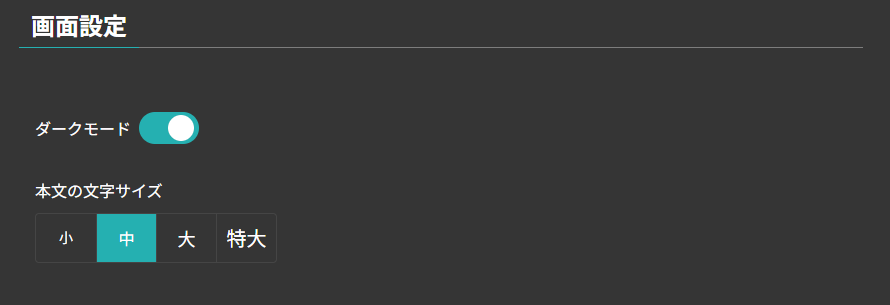
動作するページはこちら。
環境
- WordPress: 6.9.1
- SWELL: 2.16.0
- PHP: 8.2.28
やったこと
- JavaScriptでCookieに文字サイズ判定用のフラグを保存
- 文字サイズ変更用のCSSを作成
- 文字サイズを変更するためのクラスをbodyあたりに付与する処理を作成(JS, PHP)
追加CSSにスタイルを追記
カスタマイズ>追加CSSにて、下記のCSSを追記。
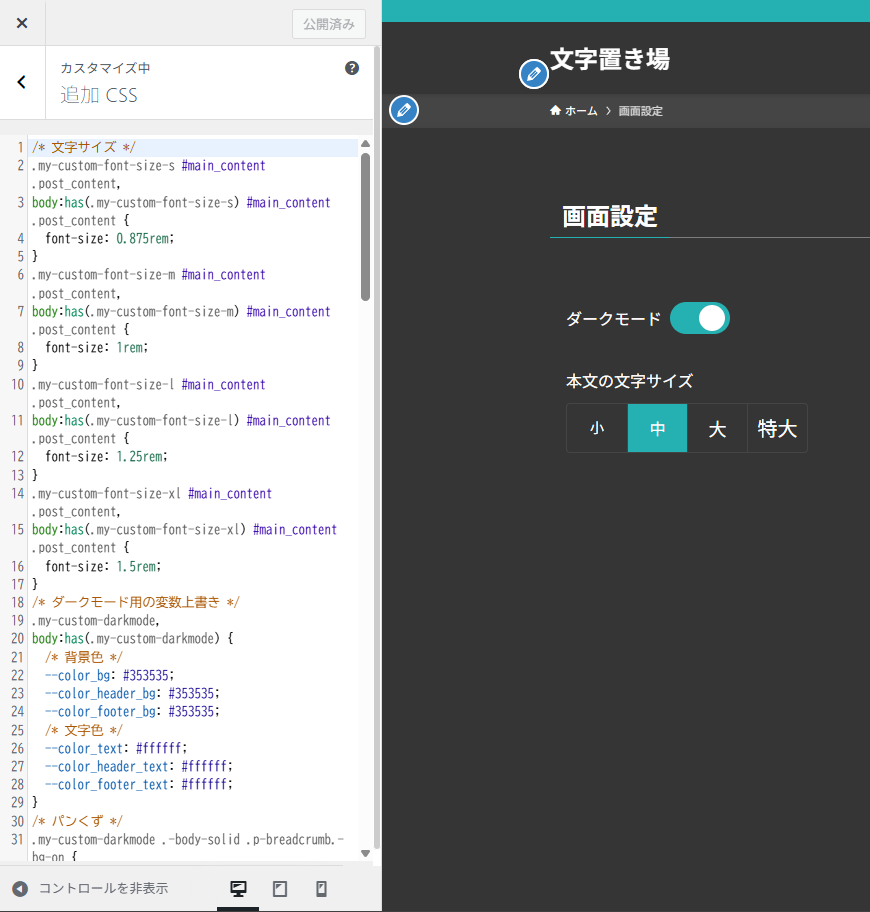
my-custom-font-size というクラスが本文の文字サイズを上書きするためのクラスで、s,m,l,xl のよっつのサイズを作成している。文字サイズ選択の入力欄のスタイルも含む。
因みに my-custom-darkmode というクラスは、ダークモードの用のクラスで、背景色や文字色のCSS変数を上書きするスタイルを追記している。ダークモード切替の入力用のトグルスイッチのスタイルも含む。
/* 文字サイズ */
.my-custom-font-size-s #main_content .post_content,
body:has(.my-custom-font-size-s) #main_content .post_content {
  font-size: 0.875rem;
}
.my-custom-font-size-m #main_content .post_content,
body:has(.my-custom-font-size-m) #main_content .post_content {
  font-size: 1rem;
}
.my-custom-font-size-l #main_content .post_content,
body:has(.my-custom-font-size-l) #main_content .post_content {
  font-size: 1.25rem;
}
.my-custom-font-size-xl #main_content .post_content,
body:has(.my-custom-font-size-xl) #main_content .post_content {
  font-size: 1.5rem;
}
/* ダークモード用の変数上書き */
.my-custom-darkmode,
body:has(.my-custom-darkmode) {
  /* 背景色 */
  --color_bg: #353535;
  --color_header_bg: #353535;
  --color_footer_bg: #353535;
  /* 文字色 */
  --color_text: #ffffff;
  --color_header_text: #ffffff;
  --color_footer_text: #ffffff;
}
/* パンくず */
.my-custom-darkmode .-body-solid .p-breadcrumb.-bg-on {
  box-shadow: inset 0 -1px 8px rgba(255, 255, 255, .06);
}
.my-custom-darkmode .p-breadcrumb.-bg-on {
  background: #454545;
}
/* SPサイドメニュー */
.my-custom-darkmode .p-spMenu__inner::before {
  background: #454545;
}
.my-custom-darkmode .p-spMenu a {
  color: var(--color_text);
}
/* トグルスイッチ */
.my-custom-toggle {
  position: relative;
  display: inline-block;
  width: 60px;
  height: 32px;
}
.my-custom-toggle-input {
  opacity: 0;
  width: 0;
  height: 0;
}
.my-custom-toggle-input:checked + .my-custom-toggle-slider {
  background: var(--color_main, #86F096);
}
.my-custom-toggle-input:checked + .my-custom-toggle-slider:before {
  transform: translateX(26px);
}
.my-custom-toggle-input:focus-visible + .my-custom-toggle-slider {
  outline: 2px solid;
}
.my-custom-toggle-slider {
  position: absolute;
  cursor: pointer;
  top: 0;
  left: 0;
  right: 0;
  bottom: 0;
  background-color: #ccc;
  transition: 0.4s;
  border-radius: 32px;
}
.my-custom-toggle-slider::before {
  border-radius: 50%;
  position: absolute;
  content: "";
  height: 26px;
  width: 26px;
  left: 3px;
  bottom: 3px;
  background: #fff;
  transition: 0.3s;
  box-shadow: 0 0 1px rgba(0, 0, 0, 0.5);
}

/* 文字サイズ切り替えタブ */
.my-custom-tab-group-wrap {
  display: flex;
}
.my-custom-tab-group {
  display: flex;
  border: 1px solid var(--color_border, #ccc);
  border-radius: 4px;
  overflow: hidden;
}
.my-custom-tab-group input[type="radio"] {
  position: absolute;
  opacity: 0;
  width: 0;
  height: 0;
}
.my-custom-tab-label {
  padding: 6px;
  cursor: pointer;
  border-left: 1px solid var(--color_border, #ccc);
  background-color: #f9f9f9;
  color: #333;
  font-size: 16px;
  white-space: nowrap;
  transition: background-color 0.3s, color 0.3s;
  display: flex;
  align-items: center;
  justify-content: center;
  min-width: 60px;
}
.my-custom-tab-label-fs-s {
  font-size: 14px;
}
.my-custom-tab-label-fs-m {
  font-size: 16px;
}
.my-custom-tab-label-fs-l {
  font-size: 18px;
}
.my-custom-tab-label-fs-xl {
  font-size: 20px;
}
.my-custom-tab-label:first-of-type {
  border-left: none;
}
.my-custom-tab-label:hover {
  background-color: #eee;
}
.my-custom-tab-group input[type="radio"]:checked + .my-custom-tab-label {
  background-color: var(--color_main, #86F096);
}
/* 文字サイズ切り替えタブ ダークモード時 */
.my-custom-darkmode .my-custom-tab-group {
  border-color: #454545;
}
.my-custom-darkmode .my-custom-tab-label {
  background-color: transparent;
  color: var(--color_text, #ffffff);
  border-left-color: #454545;
}
.my-custom-darkmode .my-custom-tab-label:hover {
  background-color: rgba(255, 255, 255, 0.1);
}
.my-custom-darkmode .my-custom-tab-group input[type="radio"]:checked + .my-custom-tab-label {
  background-color: var(--color_main, #86F096);
}

.my-custom-df {
  display: flex;
}
.my-custom-fdc {
  flex-direction: column;
}
.my-custom-aic {
  align-items: center;
}
.my-custom-gap4px {
  gap: 4px;
}
.my-custom-gap8px {
  gap: 8px;
}
CSSの注意点
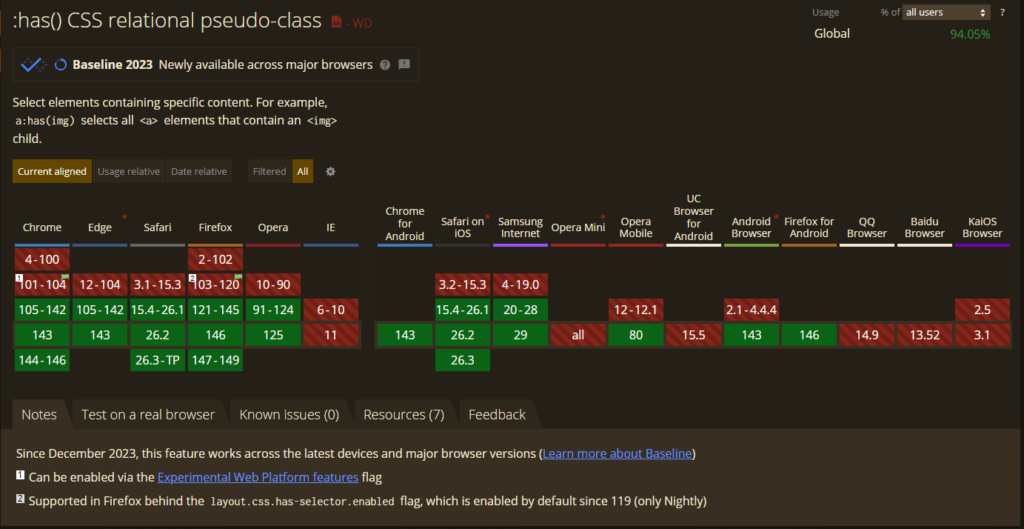
CSSにて body:has(.my-custom-darkmode) という具合に has という疑似クラス関数を使用しているため、一部のブラウザでは意図した通りにダークモードにはならない問題がある。
Can I use で確認したところ、主要なブラウザでは has 疑似クラス関数サポートされているため、大半は問題ないはず。
ダークモードと文字サイズ設定のブログパーツを作成
ブログパーツにて、カスタムHTMLの入力欄を使ってダークモード切替用のトグルスイッチのhtmlとダークモード切替用のJavaScriptを記載。
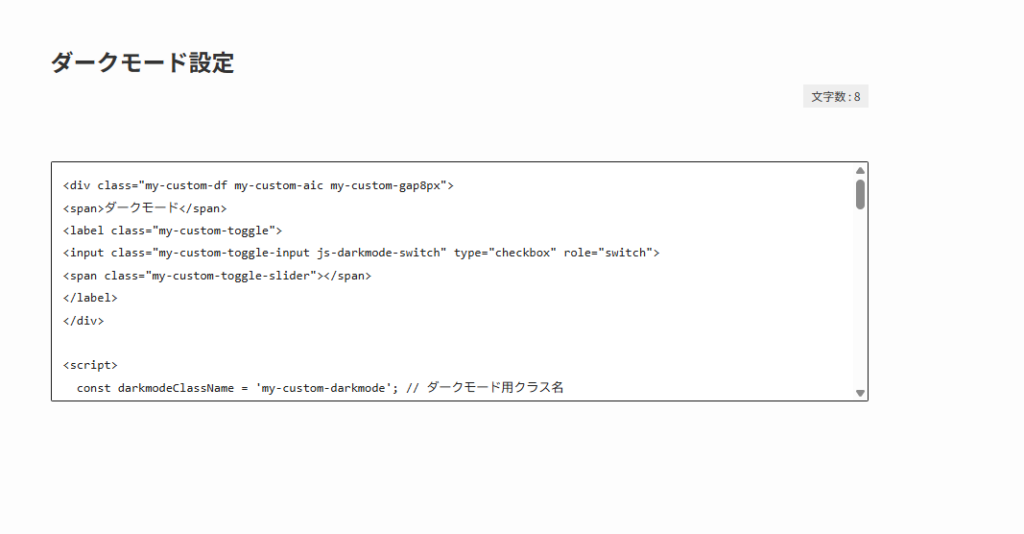
ダークモードの切り替えを行う入力欄としてチェックボックスを用意し、文字サイズの切り替えを行う入力欄としてラジオボタンを使用している。
Cookieに値を保存する際の形式は、今後、他の値も追加する可能性を考慮してオブジェクト形式にしてある。
<div class="my-custom-df my-custom-aic my-custom-gap8px">
<span>ダークモード</span>
<label class="my-custom-toggle">
<input class="my-custom-toggle-input js-darkmode-switch" type="checkbox" role="switch">
<span class="my-custom-toggle-slider"></span>
</label>
</div>

<div class="my-custom-df my-custom-fdc my-custom-gap8px">
  <span>本文の文字サイズ</span>
  <div class="my-custom-tab-group-wrap">
    <div class="my-custom-tab-group">
      <input type="radio" id="fs-s" name="js-fontsize-switch" value="1">
      <label for="fs-s" class="my-custom-tab-label my-custom-tab-label-fs-s">小</label>

      <input type="radio" id="fs-m" name="js-fontsize-switch" value="2">
      <label for="fs-m" class="my-custom-tab-label my-custom-tab-label-fs-m">中</label>

      <input type="radio" id="fs-l" name="js-fontsize-switch" value="3">
      <label for="fs-l" class="my-custom-tab-label my-custom-tab-label-fs-l">大</label>

      <input type="radio" id="fs-xl" name="js-fontsize-switch" value="4">
      <label for="fs-xl" class="my-custom-tab-label my-custom-tab-label-fs-xl">特大</label>
    </div>
  </div>
</div>

<script>
  const darkmodeClassName = 'my-custom-darkmode';
  const myCustomCookieName = 'my_custom_display_settings';

  // 文字サイズの値とクラス名のマッピング
  const fontSizeClasses = {
    1: 'my-custom-font-size-s',
    2: 'my-custom-font-size-m',
    3: 'my-custom-font-size-l',
    4: 'my-custom-font-size-xl'
  };

  jQuery(function(){
    // ========================================
    // 初回実行 (初期値のセット)
    // ========================================
    // PHPが付与したクラスを元に、入力欄の初期状態を合わせる

    // ダークモードの初期化
    if (jQuery('#body_wrap').hasClass(darkmodeClassName) || jQuery('body').hasClass(darkmodeClassName)) {
      jQuery('.js-darkmode-switch').prop('checked', true);
    } else {
      jQuery('.js-darkmode-switch').prop('checked', false);
    }

    // 文字サイズの初期化
    let isFontSizeSet = false;
    for (const [val, className] of Object.entries(fontSizeClasses)) {
      if (jQuery('#body_wrap').hasClass(className) || jQuery('body').hasClass(className)) {
        jQuery(`input[name="js-fontsize-switch"][value="${val}"]`).prop('checked', true);
        isFontSizeSet = true;
        break;
      }
    }
    // 未設定(初回訪問など)の場合は「中(2)」を選択状態にする
    if (!isFontSizeSet) {
      jQuery('input[name="js-fontsize-switch"][value="2"]').prop('checked', true);
    }


    // ========================================
    // イベント登録
    // ========================================

    // ダークモードのスイッチ操作時
    jQuery('.js-darkmode-switch').on('change', function(){
      const isDarkmode = jQuery(this).prop('checked');

      // クラスの付け替え
      if (isDarkmode) {
        jQuery('#body_wrap').addClass(darkmodeClassName);
      } else {
        jQuery('#body_wrap').removeClass(darkmodeClassName);
      }

      // 画面の入力状態からCookieを上書き保存
      saveCustomSettings();
    });

    // 文字サイズのラジオボタン操作時
    jQuery('input[name="js-fontsize-switch"]').on('change', function(){
      const val = parseInt(jQuery(this).val(), 10);

      // 既存の文字サイズクラスを全て削除してから、選択されたクラスを付与
      Object.values(fontSizeClasses).forEach(className => {
        jQuery('#body_wrap').removeClass(className);
      });
      jQuery('#body_wrap').addClass(fontSizeClasses[val]);

      // 画面の入力状態からCookieを上書き保存
      saveCustomSettings();
    });
  });


  // ========================================
  // 関数
  // ========================================

  // 画面上の入力欄の値を読み取ってCookieに上書き保存する関数
  function saveCustomSettings() {
    // 現在のダークモードの入力状態を取得 (チェックされていれば1、なければ0)
    const currentDarkmodeVal = jQuery('.js-darkmode-switch').prop('checked') ? 1 : 0;

    // 現在の文字サイズの入力状態を取得 (選択されている数値を数値型で取得、取得できなければ2)
    const currentFontsizeVal = parseInt(jQuery('input[name="js-fontsize-switch"]:checked').val(), 10) || 2;

    // 保存用のJSONオブジェクトを作成
    const newSettings = {
      darkmode_flag: currentDarkmodeVal,
      fontsize_flag: currentFontsizeVal
    };

    const jsonObj = JSON.stringify(newSettings);
    const days = 365; // 有効期限日数
    let date = new Date();
    date.setTime(date.getTime() + (days * 24 * 60 * 60 * 1000));
    const expires = "; expires=" + date.toUTCString();

    // エンコードしてCookieを書き込み
    document.cookie = myCustomCookieName + "=" + encodeURIComponent(jsonObj) + expires + "; path=/Novel";
  }
</script>
functions.phpに処理を追加
外観>テーマファイルエディタ>SWELL_SHILD>functions.php にて、下記のように追記。
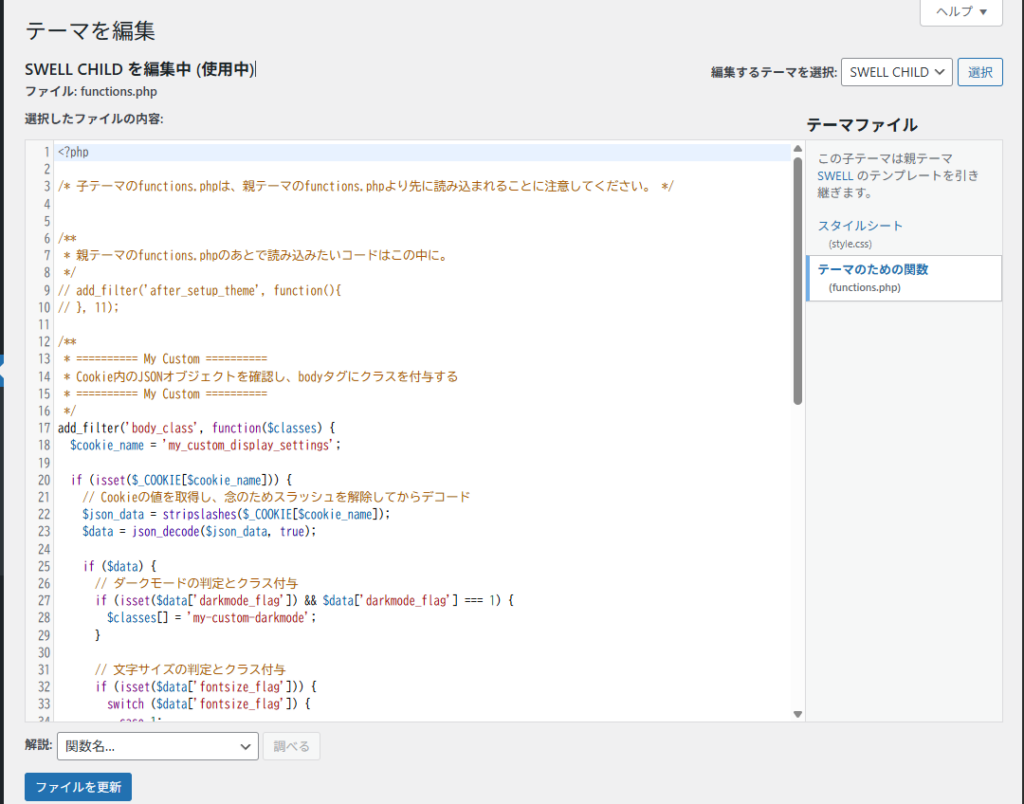
bodyタグにダークモード用クラスと文字サイズ用クラスを付与するために body_class を使っているが、SWELLの仕様なのか今一分かっていないが、body タグ配下の div#body_wrap にクラスが付与される。
そのため、前述の CSS や JavaScript は div#body_wrap にダークモード判定用のクラスが付与される前提で作ってある。
/**
 * ========== My Custom ==========
 * Cookie内のJSONオブジェクトを確認し、bodyタグにクラスを付与する
 * ========== My Custom ==========
 */
add_filter('body_class', function($classes) {
  $cookie_name = 'my_custom_display_settings';

  if (isset($_COOKIE[$cookie_name])) {
    // Cookieの値を取得し、念のためスラッシュを解除してからデコード
    $json_data = stripslashes($_COOKIE[$cookie_name]);
    $data = json_decode($json_data, true);

    if ($data) {
      // ダークモードの判定とクラス付与
      if (isset($data['darkmode_flag']) && $data['darkmode_flag'] === 1) {
        $classes[] = 'my-custom-darkmode';
      }

      // 文字サイズの判定とクラス付与
      if (isset($data['fontsize_flag'])) {
        switch ($data['fontsize_flag']) {
          case 1:
            $classes[] = 'my-custom-font-size-s';
            break;
          case 2:
            $classes[] = 'my-custom-font-size-m';
            break;
          case 3:
            $classes[] = 'my-custom-font-size-l';
            break;
          case 4:
            $classes[] = 'my-custom-font-size-xl';
            break;
        }
      }
    }
  }

  return $classes;
});